
This Is How Your Remote Team Can Succeed
It's all in one place
Everything your remote team needs to get more done


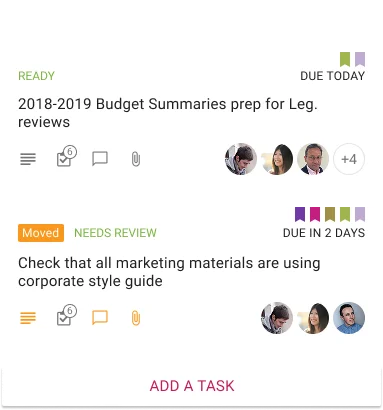
A better way to organize your work
Capture your ideas and tasks as cards on a project board
that you can customize to get the perfect workflow

A smarter alternative to email
Chat is built into cards and boards, which means
your conversations are automatically synched with your work.
Stay in the loop, even when you are out of the room
Smart highlights let you see at a glance what's new, and what's different
 Learn More
All your content, in one place
Anything from your laptop, anything from the Web. And it's all integrated with your tasks and conversations
 Learn More
Work the way you want to
Use Kerika for any kind of project, any size of team.


Store your files securely
Sign up directly, or use Kerika with your Google or Box Account
Sign up with your email
and we will safely store your project files
Learn More
Sign up with a Google ID
and your files will be stored in your own Google Drive
Learn More
Sign up with your Microsoft ID
and your files will be stored in your own OneDrive
Learn More
Sign up with a Box ID
and your files will be stored in your own Box account
Learn MoreFrom the user's perspective
 video:"Kerika frees up my Brain!"